
In short
Vibe Tooling is our name for letting AI write the code for a business tool while people set the rules: specification, test cases, permissions and sign-off. We are using it to build AI order entry for a mid-sized manufacturer. The tool is designed to read orders from email, PDF and Excel, match customer and item against the ERP and propose an order draft for review. When a match is ambiguous, it asks instead of guessing. Inside sales approves, and the ERP stays the system of record.
Key takeaways
- Vibe coding means AI writes code from a plain-language description. Vibe tooling is our word for the same way of working with the guardrails a tool needs in daily operations.
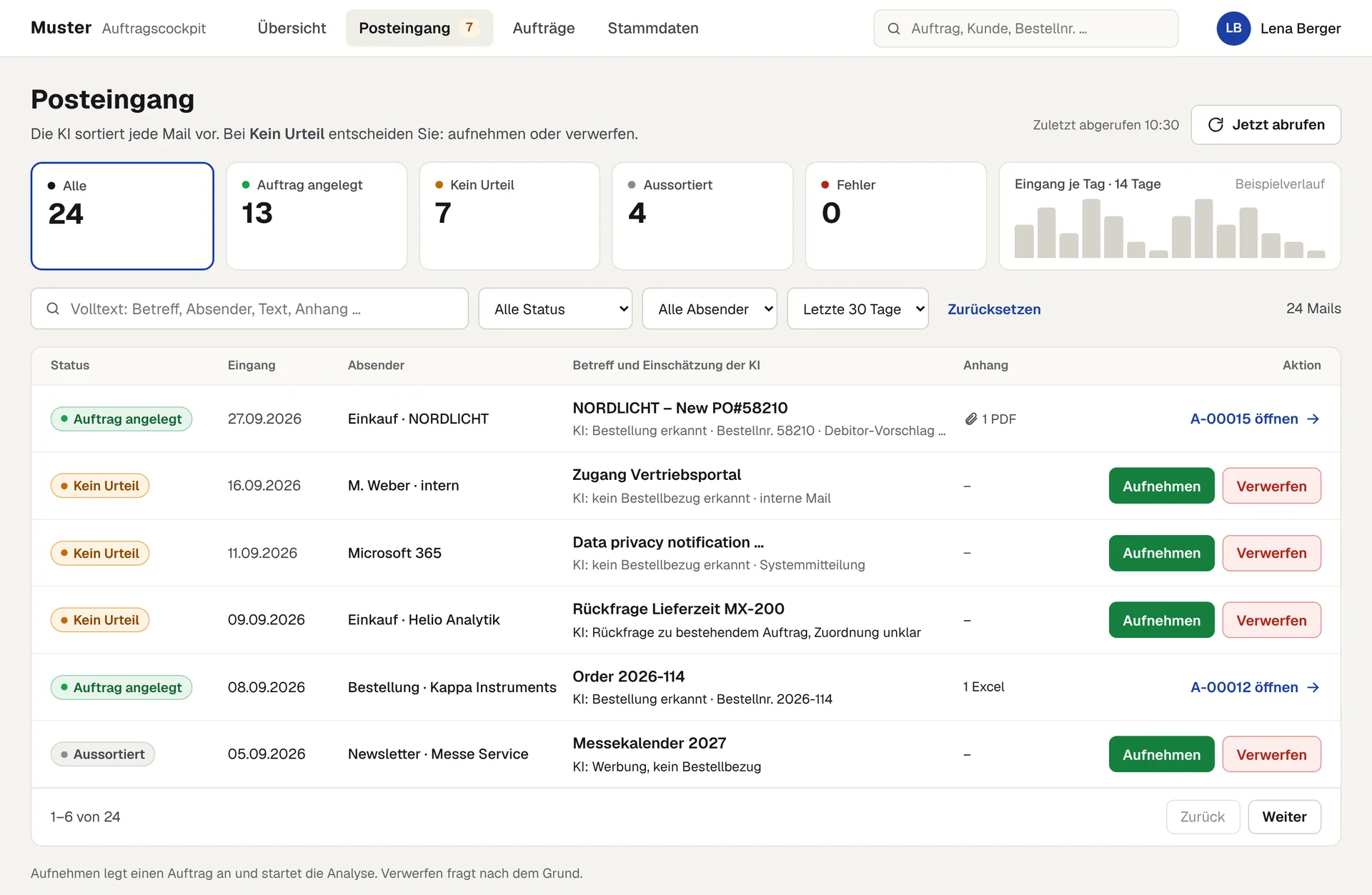
- The case: orders arrived by email, PDF and Excel and were typed into the ERP by hand. Open questions sat in inboxes, with little shared status.
- We checked the standard first, including the ERP vendor's own order agent. We build only the thin layer in front of the ERP that the standard did not cover.
- Before the first line of code there was a specification, a decision register, test cases with expected results and a critical review by a second AI model.
- The hardest part was not reading orders but matching customer and item unambiguously. Ambiguity counts as an error: the tool asks and never guesses.
- We will publish time savings only once they are measured in operation.
Vibe coding, vibe tooling: what this is about
Andrej Karpathy coined the term vibe coding in February 2025: you describe what you want, let an AI write the code and stop reading it yourself. Collins Dictionary made “vibe coding” its Word of the Year 2025. For a weekend prototype, that works. For a tool that prepares orders, applies prices and discounts and hands data to an ERP, it does not: if you forget that the code exists there, you find out through a wrong order.
Definition
Vibe Tooling is our name for building business tools with AI coding agents inside firm guardrails: people define process, rules, test cases and permissions, the AI writes the code, and nothing goes live without tests and human sign-off. As fast as vibe coding, as reviewable as conventional software engineering.
Here is what that looks like in practice, using a project from this year: AI order entry for a mid-sized manufacturer. We do not name the client. On our home page the case appears as Example 01 · Order intake.
Starting point: orders live in the inbox
Orders came in through several email addresses, as message text, PDF, Excel or a mix, occasionally as an image. Inside sales opened every email, looked for the relevant details and typed them into the ERP. Along the way they had to translate dealers' product names into items and variants, check terms and chase missing information.
- Re-keying. The same data was read, retyped and checked again.
- Open questions without status. Queries went back and forth by email; open points sat in an inbox or in someone's head.
- Sources of error. Variants, quantities, addresses, prices and discounts were all transferred by hand.
- Absence cover. If a colleague was out, nobody could see which orders were waiting in their inbox.
So the biggest losses happened not in the ERP but before it: between the inbox and structured entry.
Check the standard first, then build
Vibe tooling is no reason to build everything yourself. We first assessed four routes within the existing Microsoft environment, from the ERP's own AI order agent to an automation flow and a service and a CRM module. The order agent reads customer emails and creates quotes in the ERP; it was our recommended starting point, and we assessed it. For this case, working across several mailboxes and managing follow-up questions remained open.
The decision: no new system next to the ERP, but a thin intake and review layer in front of it. The ERP stays the system of record; the tool only reads master data, stock and terms from it. An approved order is handed over in a controlled way through the existing Microsoft environment.
How the AI order entry automation works
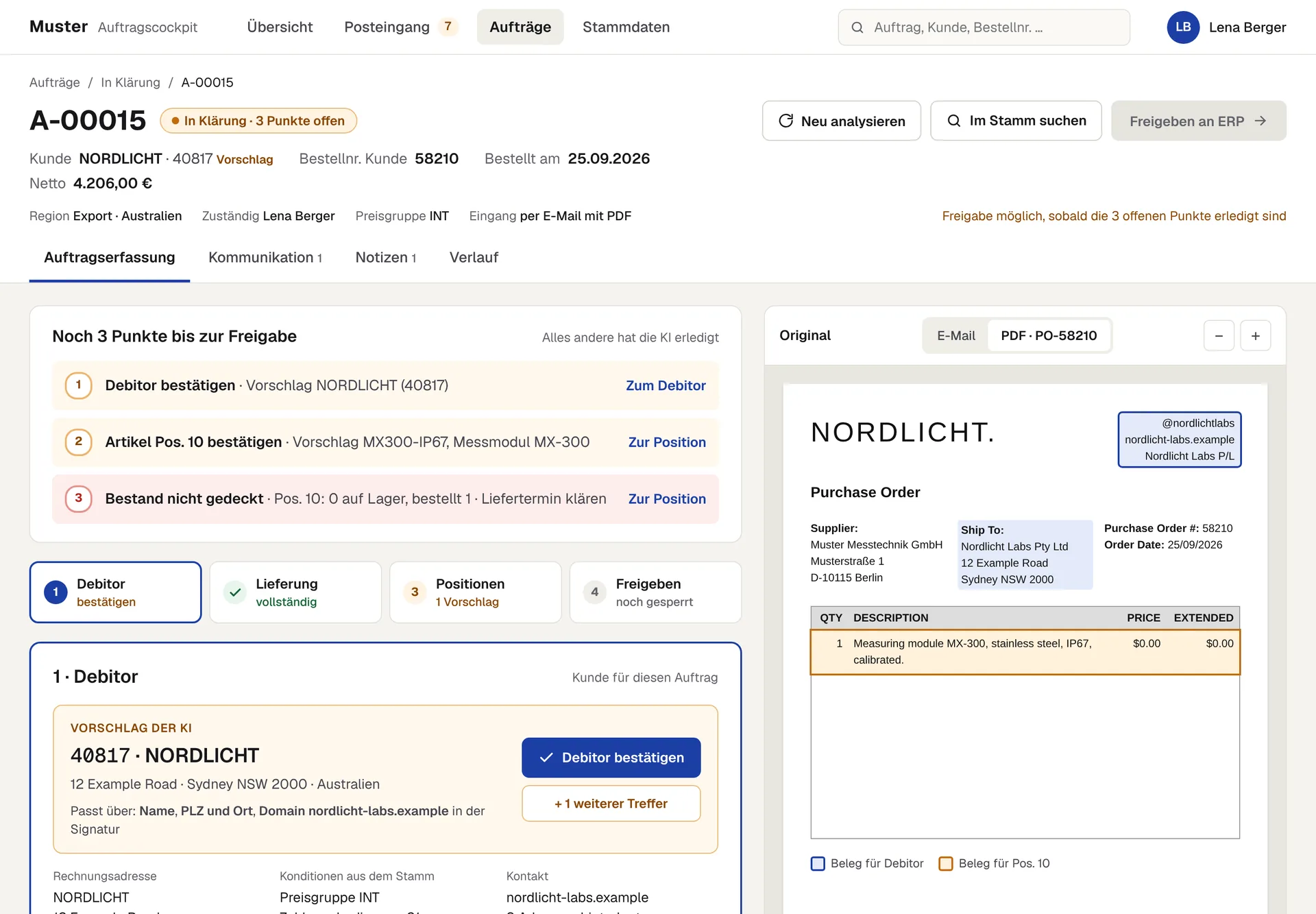
The flow is designed in seven steps:
- Fetch. The tool collects new emails from a shared order mailbox three times a day at fixed times.
- Classify. Is the email an order, a query or something else? Every relevant email immediately becomes a visible case.
- Extract. Header data and line items are pulled from message text, PDF, Excel or image into a fixed structure.
- Match. Customer and item are matched against the ERP in a fixed order (see below). Stock is checked live for each line.
- Traffic light. Every field carries a confidence: green accept, amber check, red clarify. Missing mandatory fields are flagged, never papered over.
- Approve. The responsible person in inside sales checks, corrects and approves. No ownership, no approval.
- Hand over. Only an approved order goes to the ERP. The AI drafts queries to dealers; they are sent only after approval.
The matching cascade: unambiguous or not at all
Dealers use their own names, numbers and abbreviations. So the tool searches in a fixed order, and the first unambiguous match wins:
| Match | Order of attributes | No unambiguous match |
|---|---|---|
| Customer | Customer number → VAT ID → name and country → email domain (suggestion only) | Manual selection by inside sales |
| Item | Item number → GTIN/EAN → stored customer reference → fuzzy search | Flagged for review; items not found go to purchasing |
How we build it: specification before code
Most of the code is written by an AI coding agent (Claude Code). The difference from plain vibe coding lies in what was fixed beforehand and what was checked afterwards:
- Walkthrough with inside sales. We went through order intake with inside sales using real orders.
- Clickable prototype. A simple HTML version of the review screen, so inside sales could give feedback before anything was built.
- Specification. Product concept, data model with fixed status transitions, permissions by role and region, a glossary of fixed terms and a register of 31 binding decisions.
- Test cases with expected results. Real order types together with the result that must come out. Code is checked against them.
- Review by a second model. Before any code, a different AI model critically reviewed the plan: where would an agent make something up, where is a rule ambiguous?
- Building in small tasks. Each task is a ticket. The agent implements it; automated checks and code reviews run on every change, including tests that a role cannot see or change data it should not.
- Human sign-off. Nothing is merged without review.
| Vibe coding | Vibe tooling | |
|---|---|---|
| Goal | Something that runs, fast | A tool a team relies on every day |
| Input | A description in chat | Specification, glossary, decision register |
| Checking | Trying it out | Test cases with expected results, automated checks on every change |
| Data and permissions | Often added later | Role-based permissions from day one, separate test and production environments |
| When in doubt | The AI decides | A person decides |
What we learned
- Reading orders is the easy part. Current models read PDFs and spreadsheets well. The work lies in matching master data, in special cases and in clear rules for uncertainty.
- Interfaces and permissions need lead time. Access to mailbox and ERP, app registration and rights took more coordination than some features in the code.
- A specification keeps the agent honest. Where a rule is missing, a coding agent invents one. Fixed terms, decisions and test cases close those gaps before they turn into code.
- Speed moves the bottleneck. When code appears in hours, review, testing and business questions set the pace. Someone on the client side needs time for that.
- Involve inside sales from day one. Prototype, walkthrough and short weekly check-ins surfaced wrong assumptions early.
We will publish measured time savings here once they are available from operation. We deliberately do not quote figures calculated in advance.
Vibe coding for business: where Vibe Tooling pays off, and where it does not
Vibe tooling fits when a process is clearly defined, the data sits in existing systems and standard software covers it only in part. Typical candidates are order intake, quotes, invoice checking or reporting. It does not fit when a standard product already covers the need, when nobody owns the tool after the project or when decisions are meant to happen without human review.
- Does a standard exist? Check first what your ERP or CRM already offers.
- Who owns the tool? Settle operation, further development and handover up front.
- Which data may go where? Fix data scope, environment and permissions before the first test.
- How do we measure success? Record baselines first, such as handling time per order and the share of orders needing clarification.
If you are weighing a similar tool, we are happy to talk it through: AI applications at LEADBeyond.
Frequently asked questions
What is Vibe Tooling?
Vibe Tooling is our name for building business tools with AI coding agents inside firm guardrails. People define process, rules, test cases and permissions, the AI writes the code, and only what has passed tests and human sign-off goes live.
What is the difference between vibe coding and vibe tooling?
In vibe coding you describe the result to an AI and take the code as it comes. That is enough for prototypes. In vibe tooling, the specification, test cases with expected results and permissions are fixed before the AI builds, and every change is checked automatically and approved by people.
Can AI move orders from email into the ERP automatically?
AI can read orders from message text, PDF and Excel and prepare an order draft. We recommend passing the order to the ERP only after inside sales has reviewed it, and never resolving ambiguous customer or item matches automatically.
Why not just use the ERP vendor's AI agent?
That is worth checking first. In our case the standard agent covered reading emails and creating quotes; several mailboxes and follow-up management remained open. So we build only the thin layer in front of the ERP.
Do you need in-house developers for vibe tooling?
Not necessarily for building it, but someone has to own it in operation. On request we hand over code, data and know-how completely to the client's team, or keep running the tool together.
Is vibe coding safe for business software?
Not without guardrails. With role-based permissions from day one, separate environments, automated tests and human sign-off before any write, the tool can be reviewed like conventionally built software. It does not replace a data protection review.
Sources
- Karpathy, A. (2 February 2025). Post on X introducing the term “vibe coding”., X (2025). Origin of the term; cited only for its origin and meaning.
- Collins Dictionary: Word of the Year 2025, “vibe coding”., HarperCollins (2025). Confirms the Word of the Year 2025.